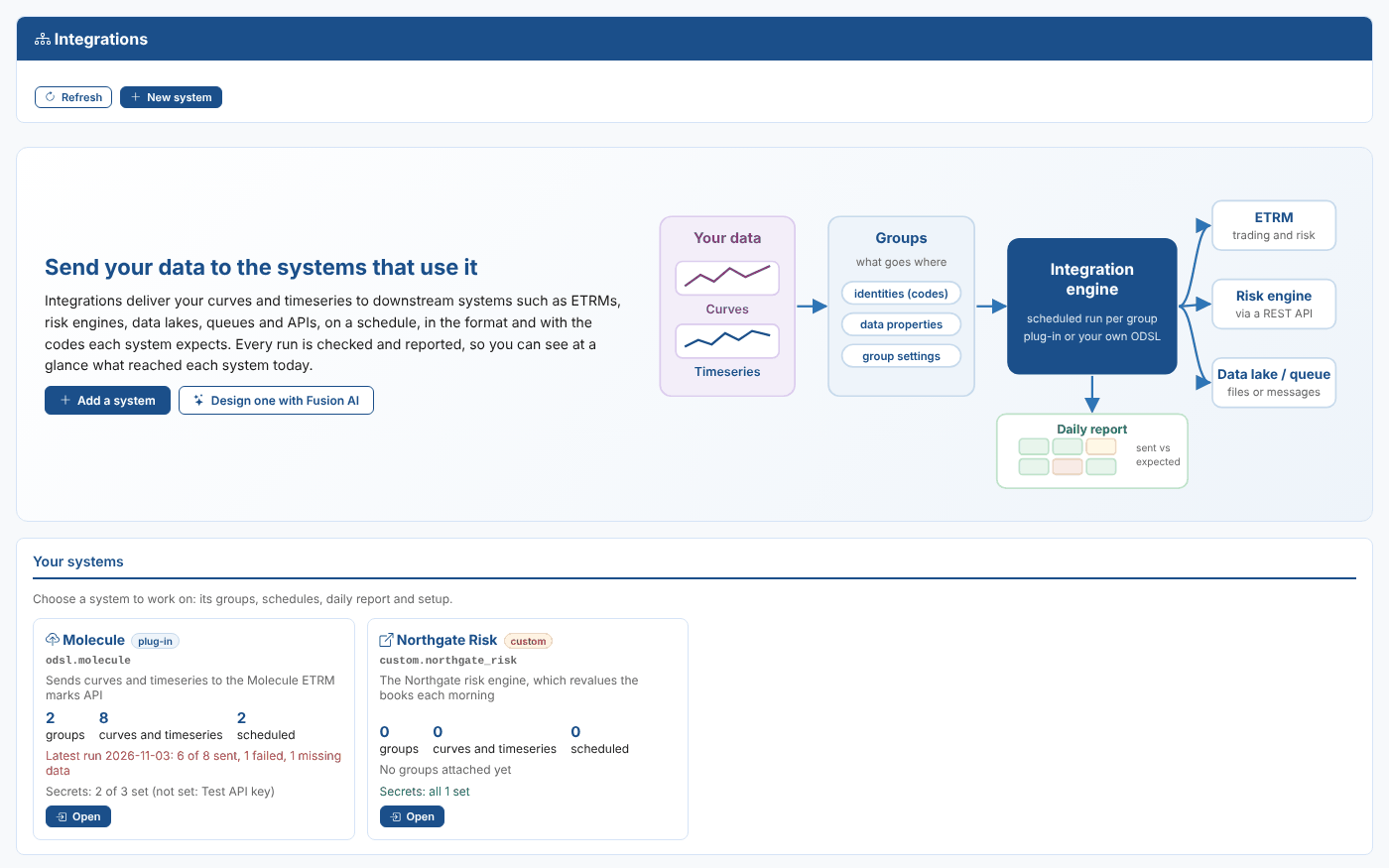
Send your curves and timeseries to your ETRM, risk engine and data lake on a schedule, in the format and with the codes each system expects, and know every day what arrived.
The Integration Challenge
The Challenge
Your curves and timeseries rarely stop at the data platform. The ETRM needs the morning forward curves, the risk engine revalues the books on them, and the data lake keeps everything for analysis. Each system wants:
- Its own format, from marks APIs to CSV files and messages
- Its own codes for every curve and timeseries
- Its own timing, daily, monthly or as quarter hours
- Its own credentials, kept somewhere safe
Usually that means a script per system, written by whoever was available, and nobody knows a curve did not arrive until a trader asks why the book looks wrong.
Worse, a bad price goes straight into the revaluation, and a vendor correction published at lunchtime never reaches the ETRM at all.
Our Solution
The Integration extension sends groups of curves and timeseries to each downstream system on a schedule, with the codes and settings that system needs, and reports every day on what reached it.
Use a ready-made plug-in such as Molecule, or set up a custom system with your own ODSL. Fusion AI can design one with you from a description.
Turn on the validation gate and only data that has passed its checks is sent. Turn on corrections and vendor revisions are sent again automatically.
Integration: The Right Data, in Every System, With Proof
Key Benefits
Replace one-off export scripts with one place to see, change and prove every delivery to every system.
Ready-Made Plug-ins
Install a system in minutes.
Plug-ins for the Molecule ETRM, Azure Blob Storage, Azure Data Lake, Azure Files, Azure Event Grid, message queues, webhooks and Power BI streaming datasets, each with the settings and secrets that system needs.
Any System, Your Code
Custom systems for everything else.
Set up a system with no plug-in, such as your own risk engine or lakehouse, with its own codes, settings, secrets and ODSL. Describe it to Fusion AI and it asks what it needs and writes the code for you to check.
A Daily Report With Proof
Sent against expected, every day.
One report per system per day, with a matrix such as location by commodity showing the number sent against the number expected. Systems can confirm what they loaded, so you know it arrived, not just that it left.
Only Validated Data Goes Out
The validation gate.
A group with the gate on only sends data that has passed its checks in the Validation extension. Anything else is held back, and the report and the alert say why.
Corrections Sent Automatically
Vendor revisions reach every system.
When a vendor republishes a settlement price or revises a capture price, the items that value feeds are sent again for every date it is in, marked as a correction.
Told When It Matters
Alerts and a cutoff time.
Raise an alert when an item fails, has no data or is held back, and set a cutoff: anything still not done at that time raises an alert, so nobody has to check the report every morning.
How Integration Works
Set It Up
Systems: install a plug-in, or create a custom system on the Integrations screen.
Secrets: the user names and API keys a system needs are kept in the platform's secret store, never on the screen or in the code.
Groups: attach a group of curves and timeseries to the system, with that system's settings for it.
Codes and properties: give each item the code the system knows it by, such as the Molecule product M.TTF.F, and the properties the report counts by.
Schedule: each group runs on its own schedule, such as every weekday at 08:00.
Every Run
Each scheduled run looks after itself:
The right date: the run works out the date to send and reads each item for it.
Checked first: with the gate on, items that have not passed validation are held back.
Sent in the system's format: each item is handed to the system's ODSL, which turns it into the format and codes the system needs and sends it.
Recorded: every group's run is merged into the system's daily report, which can be emailed and is stored for every date.
Confirmed: systems that report back mark each item complete, or failed with a reason.
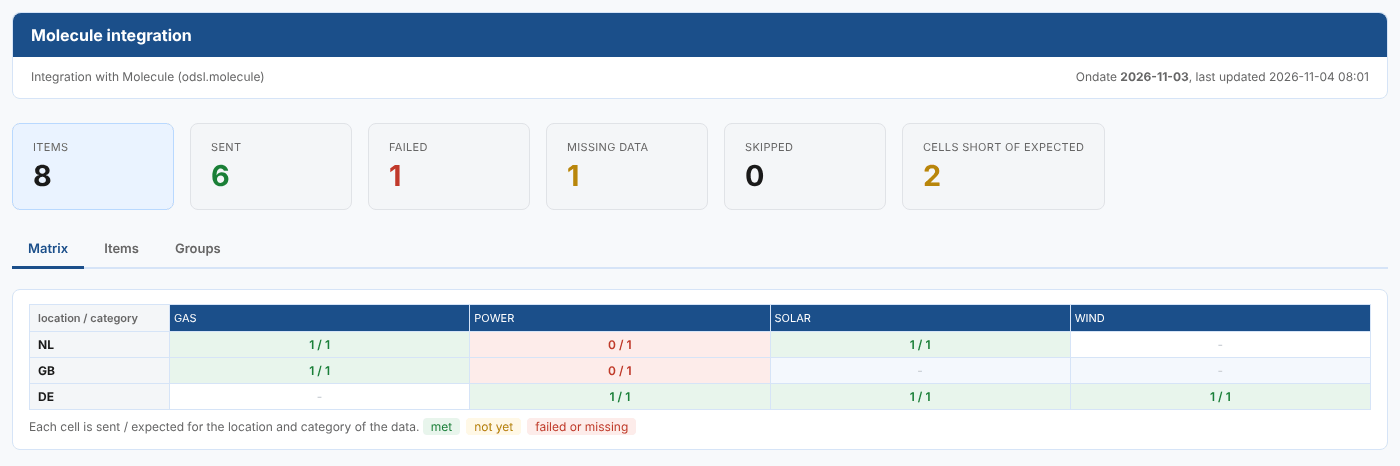
The daily report for Molecule: what was sent, failed or missing, by location and commodity.
Real-World Applications
The way energy and commodity teams use Integration every day.
Morning Curves to the ETRM
Every weekday at 08:00, the previous business day's TTF, NBP and German, Dutch and UK power curves go to Molecule as marks, with the product codes Molecule uses.
Capture Prices as Quarter Hours
On the 25th of each month, next month's solar and wind capture prices go to the ETRM as quarter hours, including the clock changes.
Your Own Risk Engine
A custom system sends the day's curves to an in-house risk engine through its REST API, and the engine confirms which curves it loaded.
Lakehouse and Reporting Feeds
Curves and timeseries land in a data lake as CSV or JSON files, on a queue for other systems, or in a Power BI dataset for the morning dashboards.
Integration with Platform Capabilities
Integration delivers the data the rest of the platform builds
From Export Scripts to Proven Deliveries
Integration replaces a scattered set of export scripts with one screen where every system, group, code and schedule is visible, and every delivery is checked and reported.
Your operations team knows by the start of the trading day that every system has the data it needs, and your traders and risk managers can trust the numbers they see.
See Your Data Reach Your Systems
Book a demo and we will show your curves going to your ETRM or data lake, with the daily report that proves it.
Get Started TodayWorkflows
How about a demo?
Our team is here to find the right solution for you, contact us to see this in action.
Fill out your details below and somebody will be in contact with you very shortly.