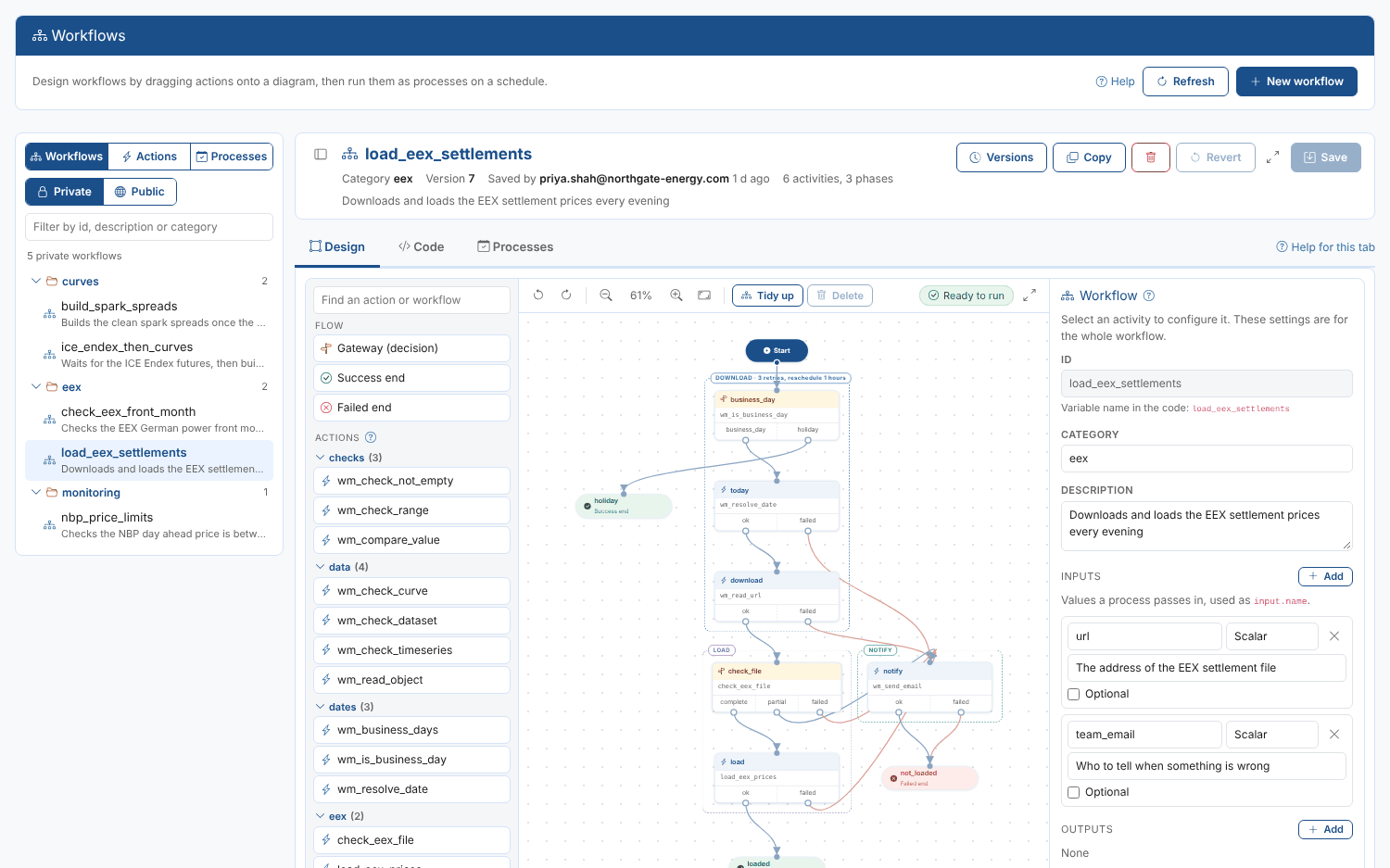
Design the steps that download, load, check and build your data as a diagram, and run them as scheduled processes with every run recorded.
The Workflow Challenge
The Challenge
Most of the work a market data team automates is a chain of steps:
- Download the settlement file every evening
- Load the prices and check they are complete
- Wait for a dataset, then build the curves from it
- Tell the team when something is missing
Written as code, these chains are hard to read for anyone but their author. What happens when the download fails, whether it retries and who is told, is buried in the script.
When a run fails overnight, someone has to work out which step went wrong before they can fix it.
Our Solution
The Workflow Manager lets you draw workflows instead: drag actions onto a canvas, connect each way a step can end to the step that comes next, and fill in the inputs in a side panel.
The ODSL is written for you, and kept in step if you prefer to change the code. A process runs the workflow on a schedule or when you start it, and every run records the status of each phase.
Start from a blank diagram, a sample workflow or the library of ready-made actions.
Workflows: Every Step Visible, Every Run Recorded
Key Benefits
Turn the steps your team runs every day into workflows anyone can read, check and change.
Draw, Don't Code
A diagram anyone can follow.
Drag actions, decisions and sub-workflows onto the canvas and connect them. The diagram is the documentation: what runs, in what order, and what happens next.
Every Outcome Has a Path
Exits and gateways.
Each step ends with an exit such as ok or failed, and each exit is connected to the step that runs next. Gateways decide between paths with an action or a few lines of code.
Start From a Sample
Common jobs, ready to use.
Sample workflows check a price has arrived, check a price is within limits, download a file, wait for a dataset, run processes in order and check a curve before building from it.
A Library of Actions
The steps most workflows need.
Installed with the extension: working out dates, checking data has arrived, making decisions, reading files from the web, starting other processes and telling people what happened.
Phases and Retries
See which part of a run failed.
Group steps into phases such as download, load and notify. Each phase is tracked separately in every run, with its own retries and its own log.
Checked and Versioned
Safe to change.
The diagram and its ODSL are checked before every save, each save is a new version, and any earlier version can be opened and made current again.
How Workflows Work
Design It
Open Manage, Workflows in the portal. A workflow opens in three tabs:
Design: the diagram, with the palette of actions on the left and the settings of the selected step on the right.
Code: the ODSL the diagram is written as, kept in step with the diagram.
Processes: the processes that run the workflow, their schedules and their runs.
Write, run and debug your own actions in the same screen, and copy any public OpenDataDSL workflow to start your own.
Run It
A process runs the workflow with its inputs:
On a schedule: a cron schedule such as every weekday at 19:00, or run it now.
With inputs: sample workflows take what they need, such as a timeseries id and a team email, so one workflow serves many processes.
Every run recorded: the status of each phase, and what it logged.
Clear endings: a run that reaches a failed end is marked failed, so the team is alerted.
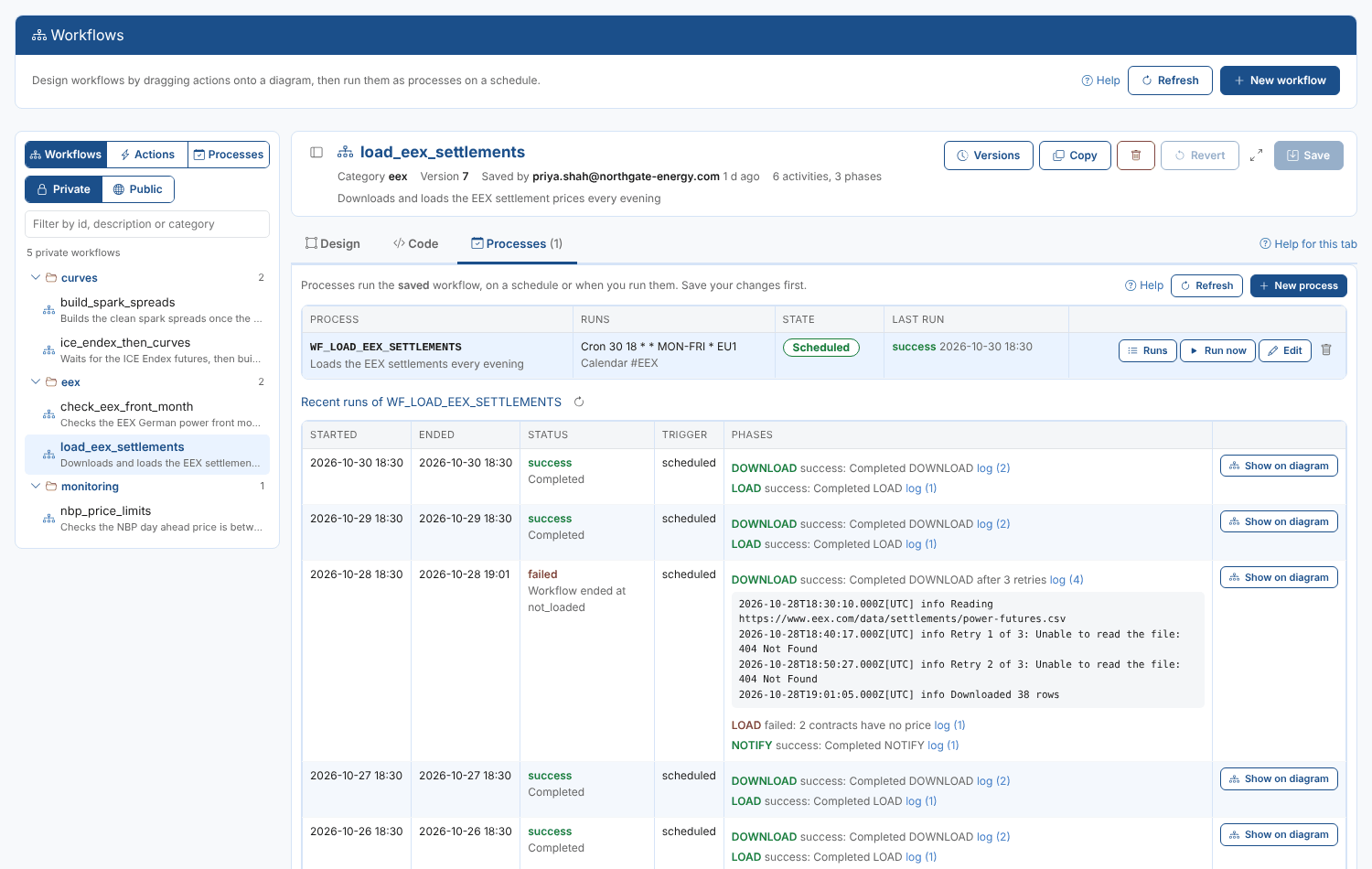
The processes that run a workflow, with each run and the status of every phase.
Real-World Applications
Workflows energy and commodity teams run every day, each one a sample you can start from.
Load the Evening Settlements
Download the EEX settlement file every evening, load the prices, check them, and end as failed so the team is alerted when the file is missing.
Check a Price Has Arrived
On each business day, check a timeseries has its value for the previous business day, and email the team when it has not.
Wait for a Dataset, Then Run
Check a dataset is complete for the day, wait and check again if it is not, then start the process that uses it, with an email when the dataset is late.
Check a Curve, Then Build
Check a settlement curve was loaded with enough contracts, then start the build process for that date, or tell the team the curve is not ready.
Integration with Platform Capabilities
Workflows connect the work the rest of the platform does
From Scripts to Workflows Anyone Can Read
The Workflow Manager turns the chains of steps your team relies on into diagrams that show exactly what runs, what happens when a step fails, and who is told.
New team members understand a workflow at a glance, changes are checked and versioned, and when a run fails overnight the phase that failed and its log are one click away.
See Your Processes as Workflows
Book a demo and we will draw one of your daily data processes as a workflow and run it on a schedule.
Get Started TodayPromotion
How about a demo?
Our team is here to find the right solution for you, contact us to see this in action.
Fill out your details below and somebody will be in contact with you very shortly.