OpenDataDSL
Promotion
From test to production, reviewed, recorded and reversible
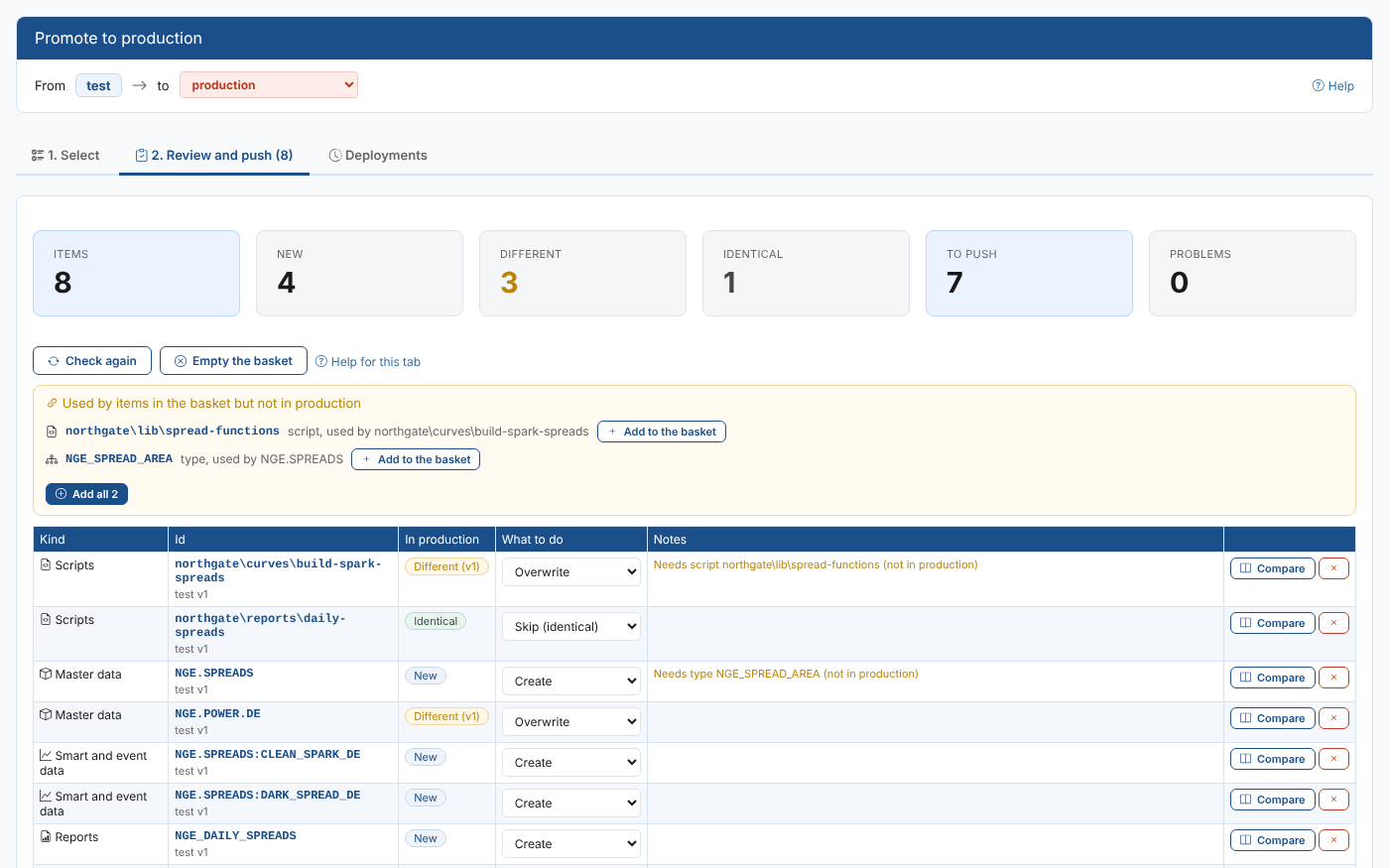
Move the curves, scripts, reports and processes you build and test into production, see exactly what will change before you push, and undo any deployment.
The Release Challenge
The Challenge
Most companies build and test new curves, scripts and reports in a separate data environment before they go live. Moving that work into production by hand is slow and easy to get wrong:
- An item is forgotten
- A script that another one imports is left behind
- A change overwrites a fix a colleague made in production last week
- Nobody records who released what, or why
And when a release goes wrong, nobody is quite sure what production looked like before it.
Our Solution
Promotion is installed in the environment you promote from, usually test. Tick the items you want to release, and it compares each one with production: new, different or already the same.
It shows a side by side comparison of every change, lists anything the release needs that production does not have yet, and lets you decide what happens to items production already has.
Every push is a recorded deployment, with a name, a reason and every item it changed, and any deployment can be undone.
Promotion: Release With Confidence, Undo With One Click
Key Benefits
Make every release to production complete, checked and reversible.
Everything in One Basket
Every kind of item.
Types, calendars, scripts, workflows, master data, smart curves, validation checks, reports, processes, dashboards, security policies and automations, ticked into one basket that is kept until you push.
See Every Change First
New, different or identical.
The review compares every item with the target environment and shows a side by side comparison, so you know exactly what will change in production before anything does.
Nothing Left Behind
Dependencies found for you.
The review lists the items your basket needs that the target does not have yet, such as a script that another script imports, with warnings before you push.
You Decide for Existing Items
Overwrite, merge, copy or leave.
For an item production already has, choose whether to overwrite it, merge it, push a copy, or leave it as it is, so a colleague's fix in production is not lost.
A Full Audit Trail
Who pushed what, when and why.
Each deployment has an id, a name and a reason, a record of every item and version it changed, its log, and the audit trail in the target environment.
Undo Any Deployment
Production back as it was.
New items are removed and changed items go back to the version they had. Anything someone changed in production after the deployment is left alone, so their change is not lost.
How Promotion Works
Select and Review
Open Manage, Promote in the environment you promote from.
Select: every kind of item in your environment, with whether each one already exists in the target. Tick the items to promote.
Review: the basket compared with the target, the items it needs, what you want done with each one, and any warnings.
Compare: open any item side by side with the version in production.
Push and Undo
When the review is right:
Push: give the deployment a name and a reason, and push it to the target.
Deployments: every deployment from this environment, with its items and versions, its log, downloads and the audit trail.
Undo: undo a whole deployment, or a single item, in the reverse order it was pushed.
Both directions: copy items from production to a test environment, change them safely, and promote them back.
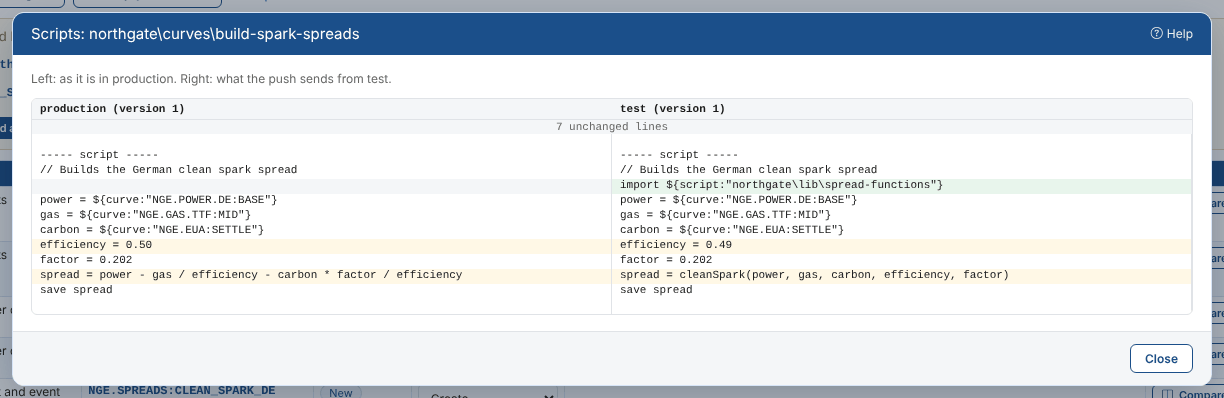
A script compared with the version in production, before it is pushed.
Real-World Applications
How market data teams release their work with Promotion.
Releasing New Curves
An analyst built German clean spark and clean dark spread curves in test, with a new script, a report for the morning meeting and a build process. One deployment takes them all to production.
Undoing a Release
The desk asks for the dark spread to wait for a new coal curve. Undo puts production back as it was, and leaves the build process a colleague moved after the release.
Working on Production Safely
Copy items from production to a test environment, change them and check the results there, then promote them back with a review that shows exactly what changed.
A UAT Step Before Production
Promote from test to a UAT environment first, have the business check it, then promote from UAT to production, with every step recorded.
Integration with Platform Capabilities
Promotion releases everything you build on the platform
From Manual Releases to Recorded Deployments
Promotion turns moving work into production from a careful manual job into a reviewed deployment, where every item, dependency and change is checked before it goes live.
Your team releases more often and with less risk, auditors can see who changed what and why, and a release that goes wrong is undone in minutes, not reconstructed from memory.
See a Release From Test to Production
Book a demo and we will promote a set of curves, scripts and reports, review every change, and undo it again.
Get Started TodayAlerts
How about a demo?
Our team is here to find the right solution for you, contact us to see this in action.
Fill out your details below and somebody will be in contact with you very shortly.