Automations - Stop Polling, Start Reacting

Automations in OpenDataDSL
How event-driven automations in OpenDataDSL eliminate manual intervention, reduce latency, and let your data pipelines run themselves.
An automation in OpenDataDSL is a rule that says: when this event happens, do that action
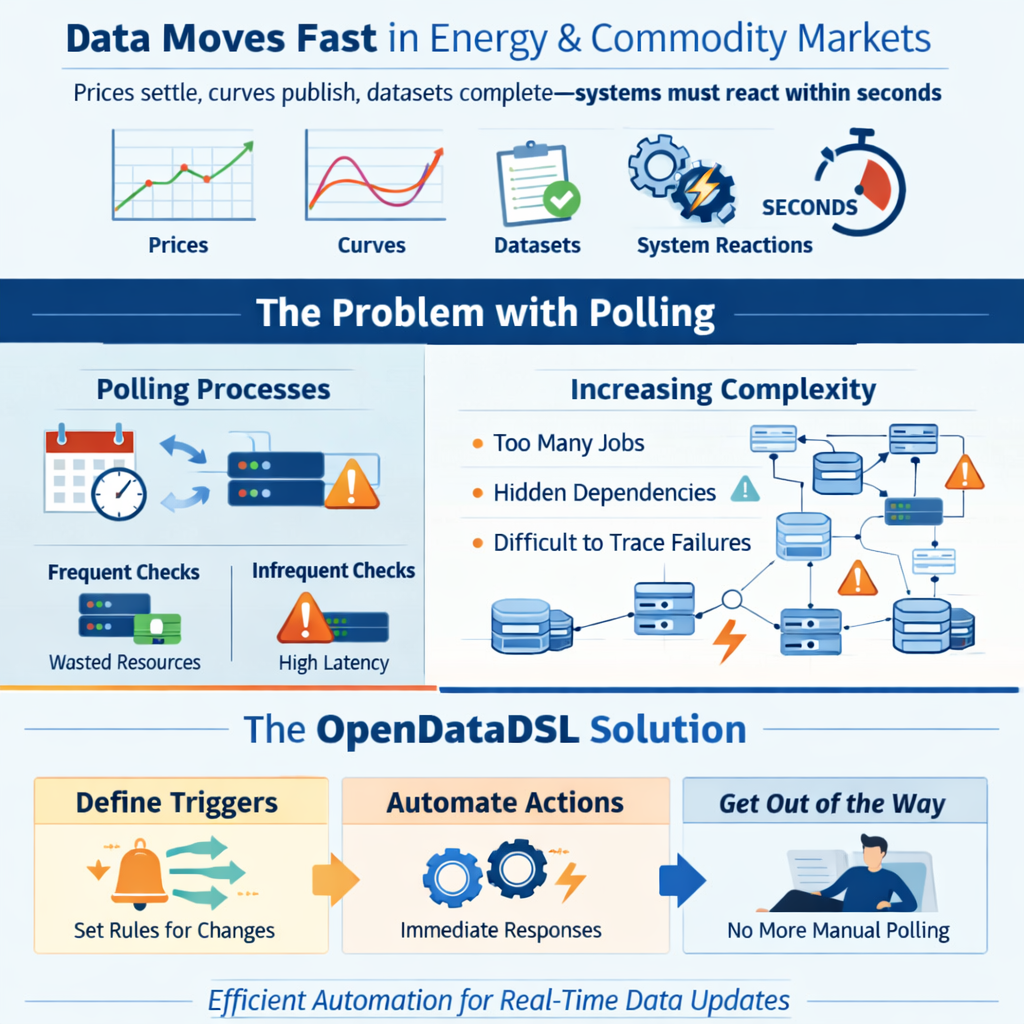
In energy and commodity markets, data moves fast. Prices settle, curves publish, datasets complete, and downstream systems need to react — often within seconds. The traditional answer to this is polling: processes that run on a schedule, check whether something has changed, and act if it has.
Polling works. But it is inherently inefficient. You are either checking too often — burning compute on nothing — or not often enough, introducing latency you cannot afford. And as your data landscape grows more complex, the number of scheduled jobs multiplies, dependencies become invisible, and failures become harder to trace.
OpenDataDSL takes a different approach. Automations let you define what should happen when something changes — and then get out of the way.
Automations in action
Watch our video on how you can easily create automations in the OpenDataDSL platform.
What is an automation?
An automation in OpenDataDSL is a rule that says: when this event happens, do that action.
Every significant change in the platform — a dataset being updated, a curve build completing, a process succeeding, an object being created — fires an event. Automations listen for those events and respond immediately, without polling, without scheduling, and without manual intervention.
A simple example: you receive daily gas price data from an external provider. When the dataset completes, you want to:
- Run quality checks
- Run critical checks if quality passes
- Rebuild your forward curves that depend on the new prices
- Email your trading desk with the updated curve
- Write the data to your Azure Data Lake for downstream analytics
In a traditional, schedule-driven architecture, each of those steps is a separate scheduled job with timing dependencies between them. Miss a timing window and the whole chain breaks silently.
With automations, each step fires when the previous one succeeds. The chain is explicit, observable, and automatic.
A real pipeline in five automations
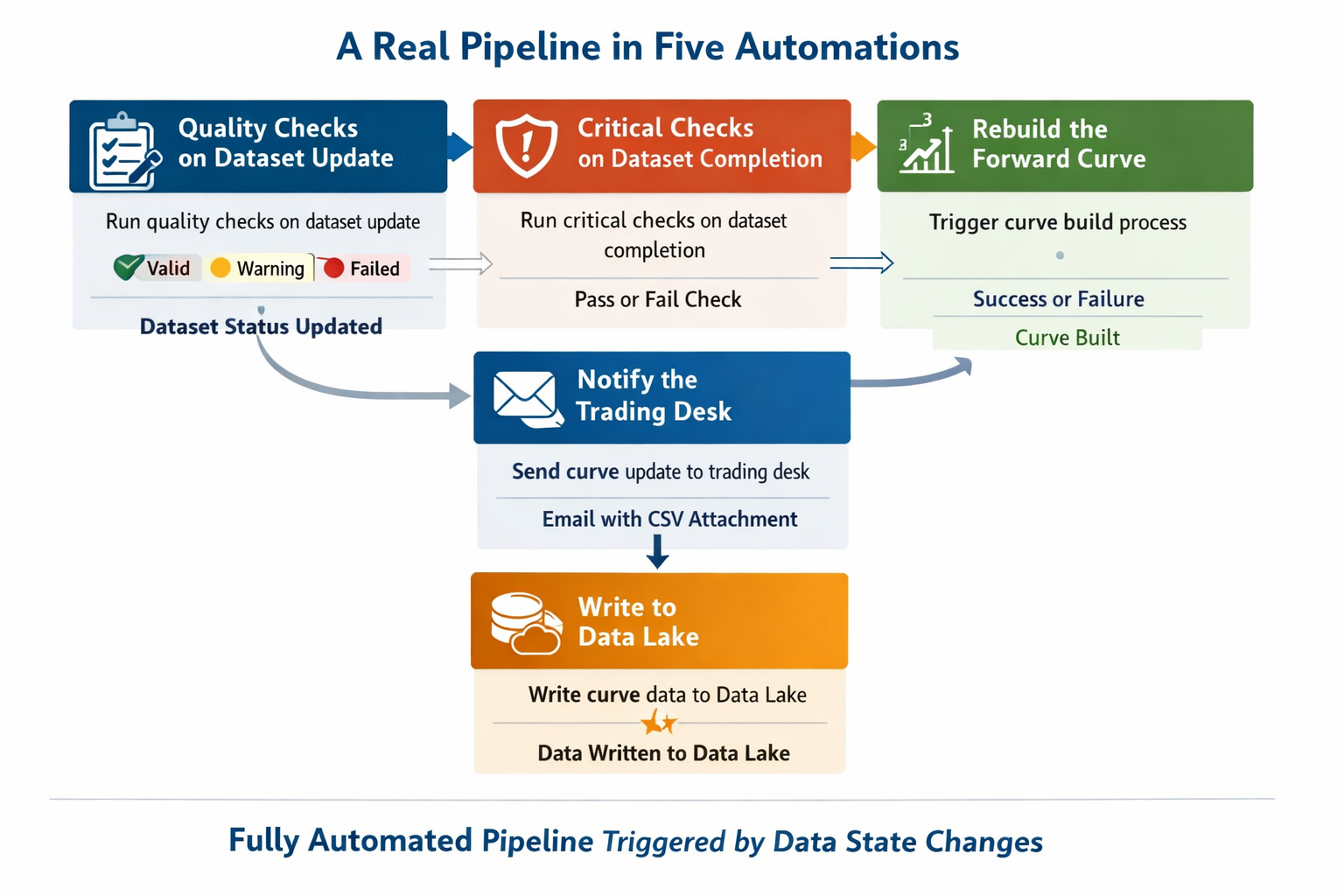
Here is what that pipeline looks like in practice. Each block is a single automation:
Step 1 — Quality checks on dataset update
When the dataset is updated, run the quality checks defined on the dataset configuration. These return valid, warning, or failed for each check, and the dataset status updates accordingly.
Step 2 — Critical checks on dataset completion
When the dataset status changes to complete (quality checks passed), run the critical checks. These are the harder gates — if they fail, the data should not be used.
Step 3 — Rebuild the forward curve
When the dataset is confirmed complete after critical checks, trigger the Smart Curve build for the forward curve that depends on this dataset. The curve build fires its own success or failed action when done.
Step 4 — Notify the trading desk
When the curve build succeeds, send an email to the trading desk with the updated curve data as a CSV attachment, formatted using a mustache template.
Step 5 — Write to Data Lake
In parallel with step 4, write the curve data to Azure Data Lake Storage, partitioned by date, for consumption by analytics tools downstream.
Five automations. No scheduler. No polling. The whole pipeline runs itself, triggered entirely by data state changes.
The power of chaining
What makes OpenDataDSL automations particularly powerful is that they chain naturally, because every action the platform takes fires further events.
- A dataset update fires
dataset:update - Quality checks completing fires
dataset:completeordataset:warningordataset:failed - A curve build fires
curve:success,curve:warning, orcurve:failed - A process run fires
process:success,process:warning, orprocess:failed - A script run fires a
scriptlog:createevent
This means you do not need to build orchestration logic — the platform's own event model is the orchestrator. Each automation only needs to know about one upstream event and one downstream action. Dependencies are implicit in the chain.
You can also run steps in parallel. A single curve:success event can trigger an email, a queue message, and a blob write simultaneously — each as a separate automation reacting to the same event.
More than notifications
Automations are not just about sending emails when something goes wrong. The full set of built-in targets covers a wide range of actions:
Compute — run a process, run a script, or run a report automatically in response to data changes. No schedule needed.
Curves and TimeSeries — trigger Smart Curve, Event Curve, and Smart TimeSeries builds whenever their input data changes. Keep derived data always current.
Storage — write data to Azure Blob Storage or Azure Data Lake Storage as soon as it is ready, partitioned however you need.
Messaging — publish data to a message queue for downstream consumers, with or without a subject for routing.
Integration — send a Teams message, raise a JIRA task, or call any external webhook, all formatted using mustache templates.
Quality — run dataset quality and critical checks automatically as part of the data arrival pipeline.
Conditional triggering
Not every update deserves to trigger a downstream action. OpenDataDSL automations support fine-grained filtering to avoid unnecessary noise.
On update actions, you can set @propertyName to only fire when a specific property has changed — useful when an object has many properties but you only care about one.
On create actions, you can set @propertyName and @propertyValue together to only fire when a newly created entity has a specific property set to a specific value. This lets you watch an entire service — all objects, all events — and only react to the ones that matter.
Combined with the wildcard id of *, this gives you broad but selective coverage without creating hundreds of individual automations.
Transforming data before delivery
Every automation target that delivers data outward — email, blob, queue, Teams, webhook — supports the @transformer property. Set it to the ID of a mustache script stored in the platform, and the data will be reshaped into that format before it leaves.
This means your downstream systems receive exactly what they expect, without any intermediate ETL step. Your ICE settlement data arrives at the trading system as a JSON payload in the trading system's schema. Your dataset completion notification arrives in Teams as a formatted Adaptive Card. Your curve lands in Azure Data Lake as a date-partitioned CSV.
Custom targets for shared infrastructure
When you have shared infrastructure — a Teams channel your whole operations team uses, an Azure storage account your data engineering team manages, a JIRA project where all data issues go — you do not want every user to configure those endpoints themselves. That is a misconfiguration risk and a credential management headache.
Custom targets solve this. An administrator creates a target that pre-fills the URL, storage account, container, or process name, and gives it a friendly name. Users building automations simply pick the target from the list — no credentials, no configuration, no opportunity to get it wrong.
For logic that goes beyond any built-in target, you can back a custom target with an ODSL script. The script receives the triggered entity and can do anything the ODSL language supports — update objects, run calculations, call external APIs, increment counters. The automation system becomes an extensible platform for reactive data logic, not just a notification router.
Observability built in
Every automation execution is logged. The automationlog service records what fired, when, what it did, and whether it succeeded. When something in a pipeline does not behave as expected, you can trace the exact sequence of events and automation executions that led to the current state.
This is a significant advantage over schedule-based pipelines, where understanding what ran when often requires trawling through process logs from multiple systems.
Getting started
If you are already using OpenDataDSL and have datasets, curves, or processes in production, you can start with a single automation. Pick the event that matters most to your team — a dataset going late, a curve build failing, a process completing — and add a notification target. That one automation will immediately surface something that was previously invisible.
From there, the natural path is to replace scheduled triggers with event-driven ones, chain your quality and delivery steps together, and gradually build a self-running data pipeline that only needs human attention when something actually needs human attention.
The documentation for automations, including all available targets and worked examples, is available at doc.opendatadsl.com.
OpenDataDSL is a cloud-native data management platform for energy and commodity markets. It provides timeseries, forward curves, datasets, and automation tooling built for the complexity of commodity data operations.
Fill out the form below, we will contact you to arrange a personally tailored demo.

How about a demo?
Our team is here to find the right solution for you, contact us to see this in action.
Fill out your details below and somebody will be in contact with you very shortly.