Validation - Trust Every Curve and Timeseries Before Anyone Uses It

Introducing Validation
Every energy and commodity business depends on market data being right: forward curves, settlement prices, fundamentals, FX rates. Most of the time it is. The problem is the rest of the time.
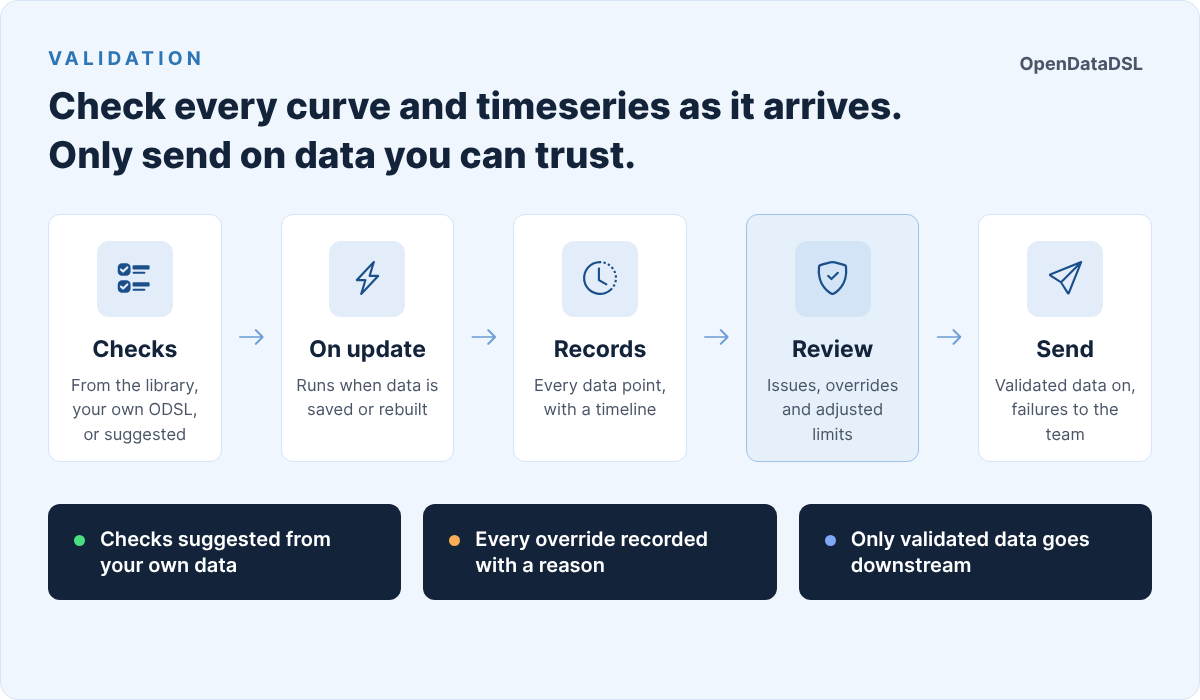
Validation checks every curve and timeseries on OpenDataDSL as it arrives, keeps a record of every data point, and makes sure only data that has passed, or that someone has signed off, goes any further.
When market data goes wrong
Bad data rarely looks bad. It arrives through the same feed, at the same time, in the same format as every other update:
- A settlement price that was published in the wrong units, a hundred times too big
- A forward curve with the fourth quarter missing
- A curve that is identical to yesterday's, because the source did not update
- A daily series with a gap over a holiday nobody planned for
- A genuine spike after a market announcement, that looks exactly like an error
Each one is easy to spot once you know to look. The trouble is that by then it has usually been used: in a valuation, a risk report, a customer price or a model. And when someone asks afterwards whether the data was checked, the honest answer is often "someone had a look".
Checks that run themselves
With Validation, each curve or timeseries has a validation configuration: a list of checks, each a line of ODSL. Most come straight from the validation library, 19 ready-made checks such as:
| Check | What it catches | Example |
|---|---|---|
| Range | A value outside sensible limits | checkRange(20, 60) |
| Change % | A move too big from the previous value | checkChangePct(4) |
| Outliers | A value far from recent history | checkZScore(4) |
| Stale | A value that has stopped changing | checkStale(3) |
| Gap | A hole in a timeseries | checkGap(5) |
| Tenors | Tenors missing from a forward curve | checkCurveTenors("M01,M02,Q01") |
| Gaps | Gaps between a curve's delivery periods | checkCurveGaps() |
On a forward curve, tenor checks run on every contract and whole-curve checks run once, and any failing tenor fails the curve. Each check has a severity: a small move can be a warning while a missing value is a failure. And because checks are ODSL, you can write your own for anything the library does not cover.
The checks run automatically, every time the data is saved, and every time a smart, event or composed curve or timeseries is rebuilt. Public and common data is checked in your own environment, with your own checks, so two clients using the same exchange curve can each check it their own way.
A record for every data point
Every curve ondate and every timeseries observation gets a validation record. It shows the result of every check, the result of every tenor, and a timeline of everything that happened to that data point: each run, each comment, each override and each time it was sent on.
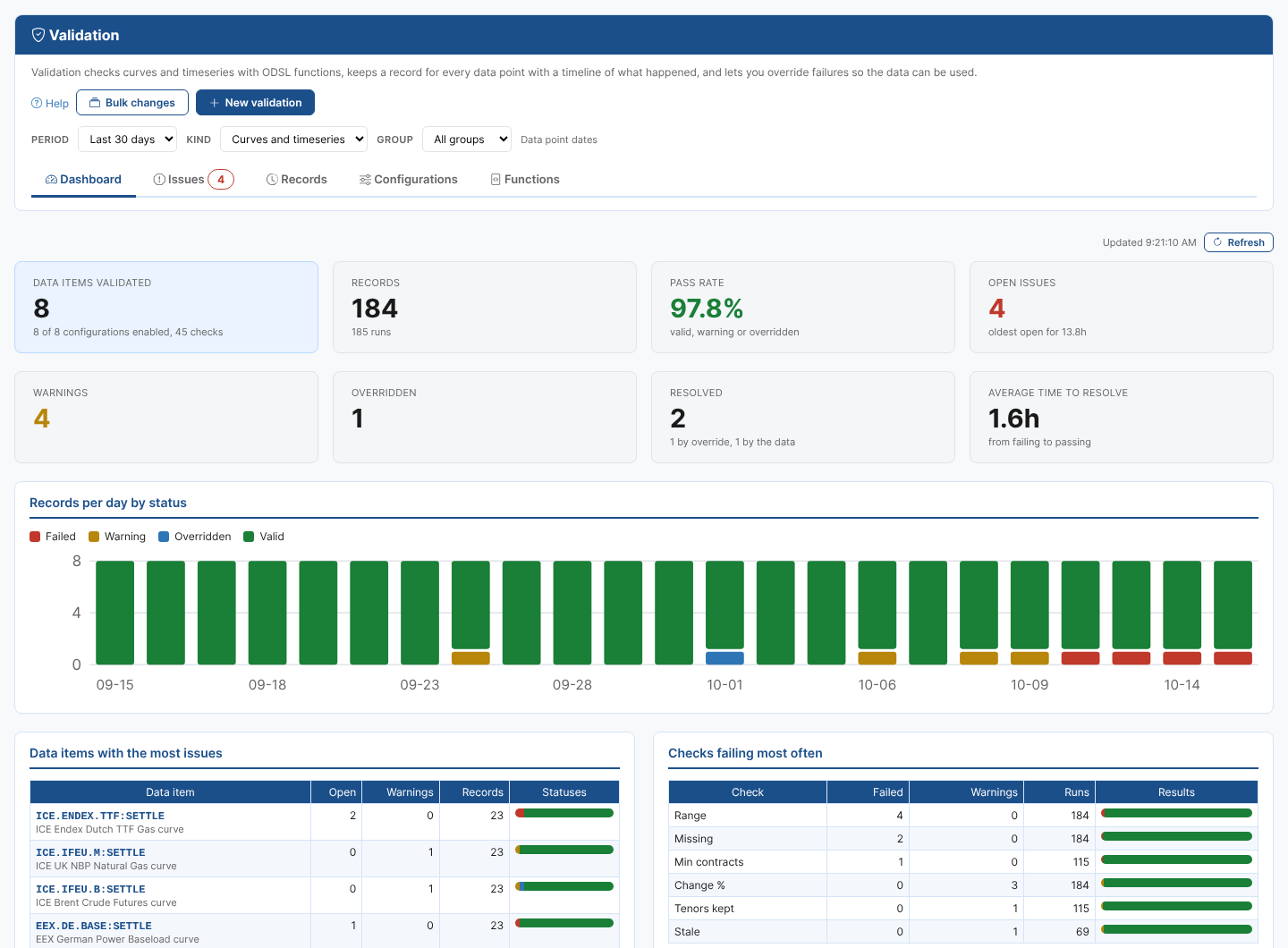
The Validation dashboard brings it together: how many data items are validated, the pass rate, open issues and warnings, records per day by status, and the data items and checks that fail most often.
Failing data points appear on the Issues tab, oldest first. From there you can run the checks again once the data is corrected, comment, or override a failure.
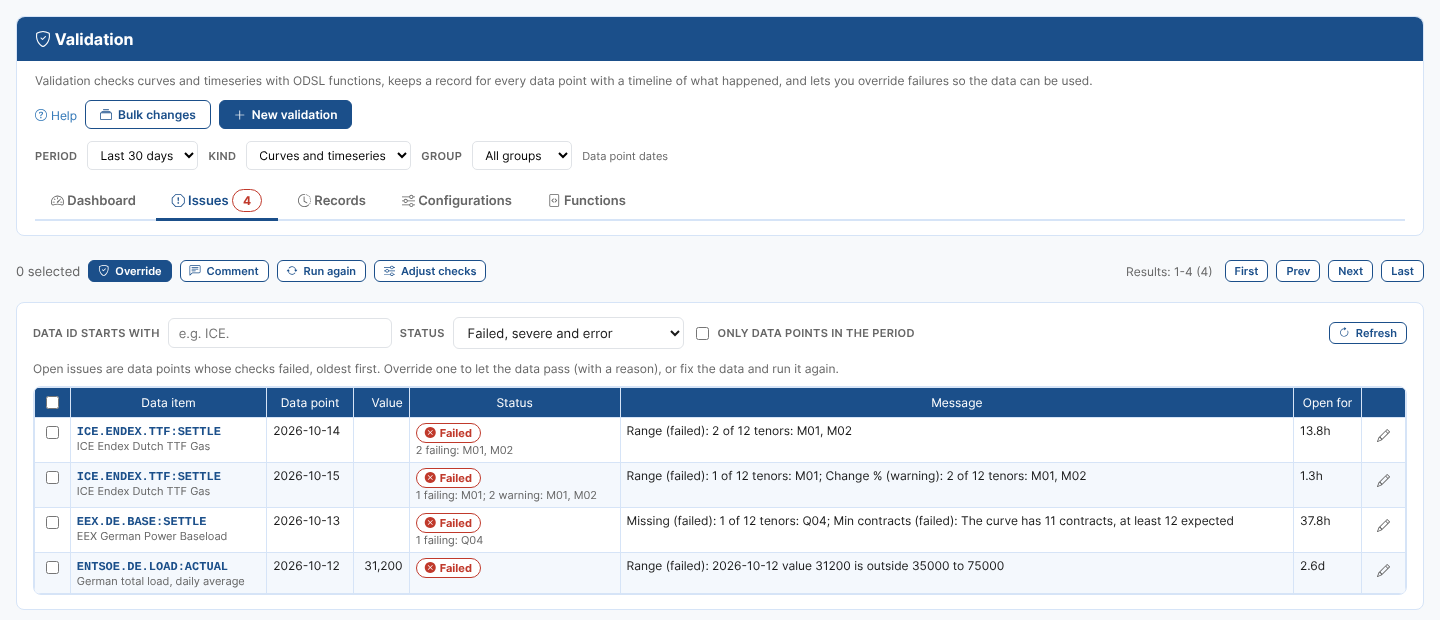
An override is how a genuine move gets through: say the front month of Brent jumped after an OPEC+ announcement. The override needs a reason, it is kept in the record's timeline with who made it, and it belongs to that data: if the data changes, it is checked again from scratch.
A worked example: setting up gas curves in minutes
Setting limits for hundreds of curves by hand is where most data quality projects stall. What should the range be for Dutch TTF? How big a daily move is normal for German THE?
Validation can answer that from the data itself. In Bulk changes, pick the curves, say the TTF, THE, PEG, ZTP and PSV gas curves, and choose Suggest checks. For each curve, Validation:
- Reads the curves of the last 30 days.
- Suggests checks with limits that fit: a range around the prices seen with a margin, a change limit above the largest daily move, the tenors that were on every curve, and the number of contracts.
- Tries the suggested checks on that same history, without saving anything.
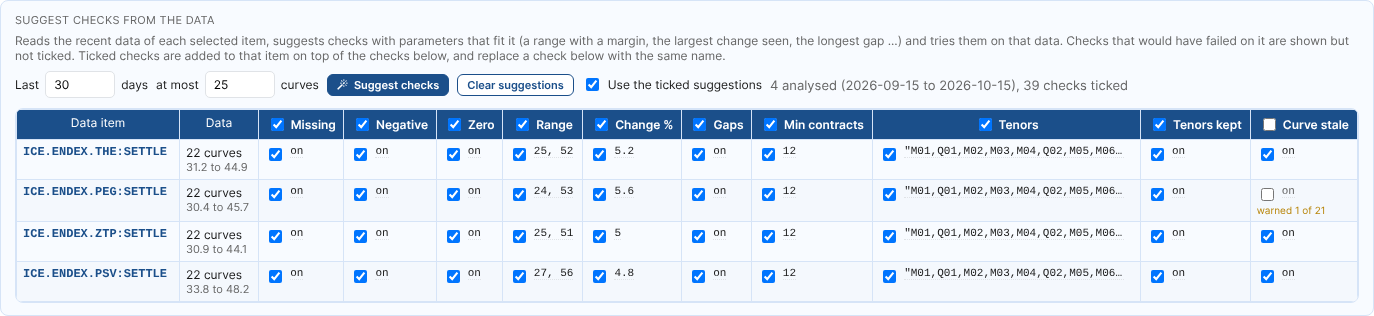
Any check that would have failed on the history is shown but not ticked, with an example of the failure. Above, one curve was identical to the curve before it on one day, so the stale curve check is left for you to decide on. Tick and untick checks for one curve or for all of them, change any limit, and save: each curve gets its own limits, fitted to its own data.
When a limit is too tight
Markets move. A change limit that was right in a quiet month raises false alarms in a busy one, and the usual answer is to loosen it by guesswork, or to stop looking at the warnings.
On the Issues tab, select the failing records and choose Adjust checks. For each check that failed, Validation works out the smallest change to its limit that lets those data points pass, adds a small margin, and shows how many data points of the last 30 days fail now and would fail with the new limit.
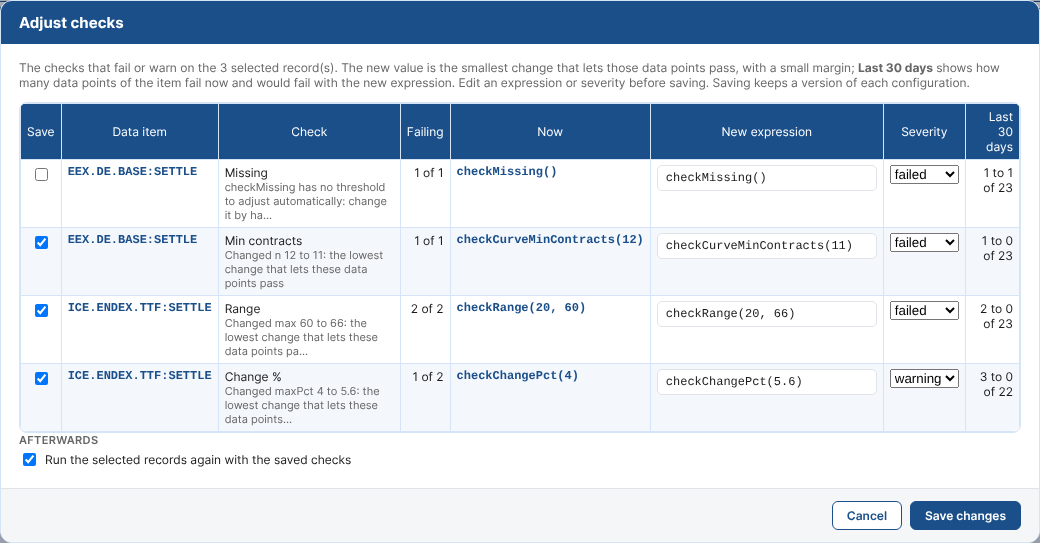
So you can see that raising the TTF change limit from 4% to 5.6% clears three warnings over the month without hiding anything else, and save it in one click. Or change the checks of an item directly from its issue, test them on the failing records, and run them again.
Every change is kept. The configuration's History shows each version, who saved it, and exactly what changed, and any version can be compared or restored.

Only send on data you can trust
Validation is not just a report. Two new automation actions let the rest of your systems act on it:
- Passes validation: a curve or timeseries is sent on, to a queue, a file, an email or another system, only once it passes validation or a failure is overridden. Downstream systems never see data that failed.
- Fails validation: as soon as data fails, the team gets an email listing every failing data point, every failing tenor and every check, ready to act on.
Data that has been checked also carries its quality status, so anyone looking at a curve or timeseries can see whether it passed.
Getting started
Validation is available now as an extension for OpenDataDSL customers. Open Information > Validation, or the Validation tab of any curve or timeseries on the Data screen, and start with the suggested checks.
The documentation covers everything in detail:
- What is Validation?
- Getting started
- Checks and settings
- Dashboard, issues and overrides
- Bulk changes and suggested checks
Data you can trust, with the proof.
OpenDataDSL - Go Beyond the Basics.
Next steps
Do you want to see what Validation would catch in your data?
Tell us which curves and timeseries matter most to you, and we will suggest checks from their own history and show you what they would have caught.
- Contact us at info@opendatadsl.com
- Sign Up today and become part of the OpenDataDSL community!
- Fill out the form below, we will contact you to arrange a personally tailored demo.

How about a demo?
Our team is here to find the right solution for you, contact us to see this in action.
Fill out your details below and somebody will be in contact with you very shortly.