Fusion AI Playbooks - Your Best Process, Run the Same Way Every Time

Introducing Fusion AI Playbooks
Every energy and commodity data team has jobs it repeats again and again, and each one has a right way to do it. Usually that way lives in one person's head.
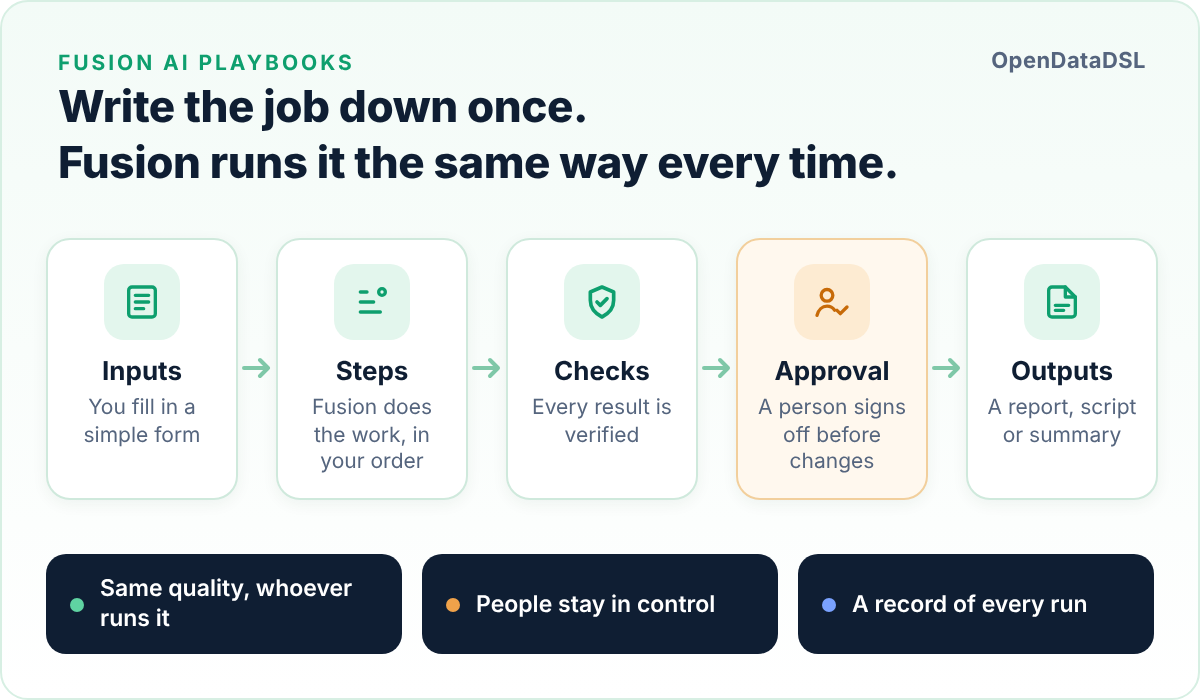
Fusion AI Playbooks let you write the job down once, in plain language, and have Fusion run it step by step on your OpenDataDSL data: checking its own work, asking before anything changes, and keeping a record of every run.
The jobs that never go away
Think about the work your data team did last week. Somewhere in it you will find jobs like these:
- Setting up monitoring and quality checks for a new dataset
- Checking this morning's forward curves before traders and risk rely on them
- Working out why a delivery was late, and telling the right people
- Triaging failed processes and deciding which ones to rerun
- Pulling together the month-end summary of the markets you follow
None of these are hard for the person who usually does them. They know which curves move a lot near expiry, which provider is always late on a holiday, which process failures a rerun will fix and which ones it will not. The problem is that this knowledge rarely gets written down, and when it does, it lives in a wiki page nobody opens.
When that person is busy, on holiday or moves on, the job is done differently, done late, or not done at all.
Why a chat is not enough
General purpose AI assistants are very good at answering questions, and Fusion already does that well for the OpenDataDSL platform. But a repeatable job needs more than a good answer:
- Consistency. Ask an assistant the same thing twice and you may get two different approaches.
- Verification. Nothing checks the answer unless you do.
- Control. Changes to the platform should be approved by a person, not just confirmed in a conversation.
- A record. You need to know what was done, by whom, and what it cost.
- Running unattended. Some jobs should run every morning whether anyone is at their desk or not.
That is the gap Fusion AI Playbooks fill.
What is a playbook?
A playbook is a markdown document that describes one job. It reads like the brief you would give a capable new colleague, with a few marked blocks for the parts Fusion needs to know exactly:
| Block | What it describes |
|---|---|
| Inputs | What the person running it fills in: the curves, the dataset, the month, the people to email |
| Steps | The work, in order. Each step has instructions in plain language, the assistant best suited to it, and the tools it may use |
| Checks | What each step's result must satisfy before the run moves on |
| Transitions | Rules that choose the next step, such as "if nothing is wrong, stop here" |
| Approvals | Where a person signs off before anything on the platform changes |
| Outputs | What the run hands back: a report, a script, a summary, a count |
Everything else in the document is guidance: your house style, what counts as a problem, what good looks like. Fusion reads it at the start of every run.
Here is part of the Curve quality check playbook from the OpenDataDSL library:
```input
name: maxMove
label: Largest allowed move (%)
type: number
default: 15
validate: {min: 1, max: 200}
```

```step
id: inspect
title: Inspect the curves
tools: [get_latest_curve, get_curve, find_curve_build, get_holidays]
instructions: >
  Check each curve for big moves, missing tenors, stale data and bad prices.
  Set findingsTable to a markdown table of curve, tenor, values and reason,
  and issueCount to the number of findings.
produces: [findingsTable, issueCount]
```

```check
step: inspect
rule: Every curve in the list was read and every finding names its values.
onFail: retry
```

```transition
from: inspect
when: "@{steps.inspect.issueCount} == 0"
to: end
```
Fusion turns the inputs into a simple form. Anyone on your team fills it in and presses Run.
What happens when a playbook runs
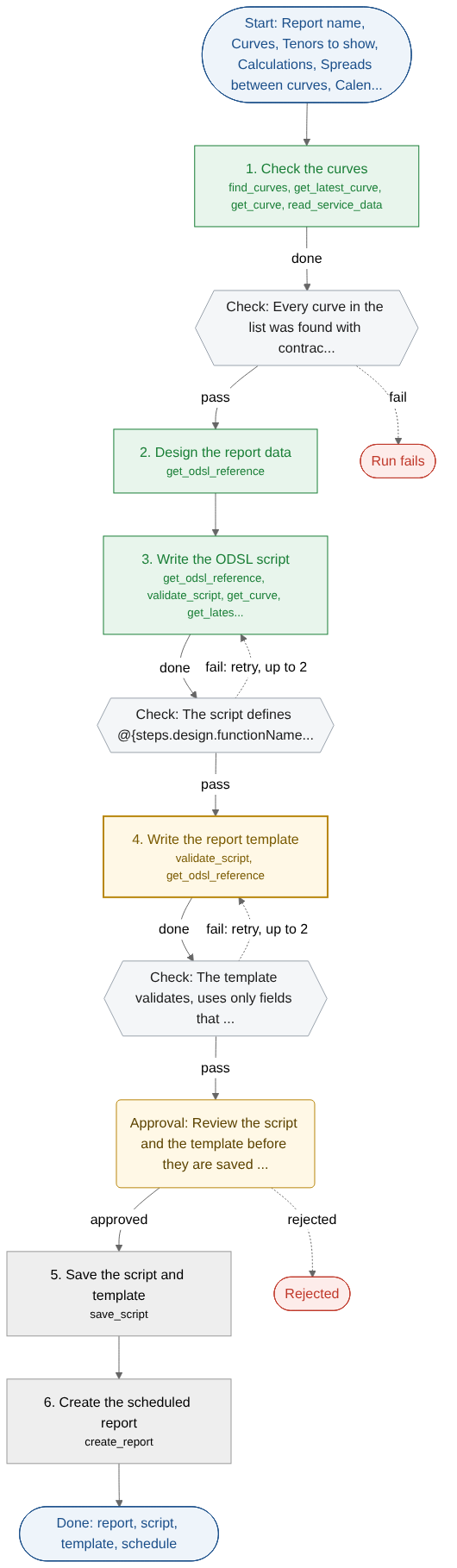
Fusion follows the playbook one step at a time, exactly as written:
- Focused steps. Fusion works only on the current step, with that step's assistant and only that step's tools plus a few read-only ones. A step that reads curves cannot save a script. The playbook decides the order, not the AI.
- Structured results. Each step records the values it was asked for, such as a table, a script or a count, so later steps, checks and transitions work from facts rather than prose.
- Checks after every step. Rules like "every curve was found", "the script validates" or "every number in the commentary matches the figures" are verified before the run moves on. If a check fails, Fusion runs the step again and is told why, goes back to an earlier step, or stops so a person can look.
- Decisions that follow your rules. Transitions choose the next step from the results: end quietly when nothing is wrong, investigate when a delivery was late.
- Approvals before change. Before anything is saved, created, run or sent, the run waits. Approvers can be named people or user groups, they are emailed when a run needs them, and your tenant decides whether people may approve their own runs.
Built for teams that need to trust the result
Playbooks were designed around one question we hear from every data and trading team: how do I know it did it properly?
- Your access rights apply. Every read and write goes through the platform with the permissions of the person running the task, so a playbook can never see or change more than they could.
- Every run is recorded. Each step's result, every check and its reason, every approval with who made it and when, and the tokens used. Each playbook can be shown as a flow diagram coloured by the run's progress, and the Playbook Runs report shows success rates, failures and costs across all your playbooks.
- Costs are bounded. Each run has a token cap, and runs respect your tenant's Fusion AI budget and limit.
- Versioned. Every save of a playbook is a new version, and every task records the version it ran.
Run it however suits the job
- On the page, watching each step complete.
- In the background, closing the page while Fusion carries on, with approvers emailed when they are needed.
- On a schedule, such as 07:00 every weekday, with each run recorded separately.
- From the chat. Ask Fusion to "run the curve quality check on the NBP and TTF settlement curves" and it fills in the task from the conversation and shows it as a card, ready for you to run. Fusion never starts a run on its own.
Suggest values asks Fusion to fill in a form for you, looking up real curve and dataset names on the platform. A run that fails or stops can be resumed from the step where it stopped.
Ready-made playbooks in the library
You do not have to start from a blank page. The OpenDataDSL library includes playbooks for the jobs our customers ask about most:
- Curve quality check: flags big day-on-day moves, missing tenors, stale curves, bad prices and shape breaks, using each curve's own calendar, and raises one alert per curve with problems.
- Dataset onboarding: turns quality rules written in plain words into dataset checks, writes a setup script, and after approval runs and verifies the monitoring.
- Late dataset investigation: checks the delivery and its history, tells a one-off apart from a habit, reads the loading processes and their logs, and writes a short root-cause summary.
- Process failure triage: groups failures by root cause with evidence from the logs, proposes a fix for each, and reruns the ones a rerun can fix once someone approves.
- Scheduled curve report: writes and validates the ODSL script and report template for a daily report on the curves you choose, then creates the scheduled report.
- Month-end market summary: works out averages, ranges and moves for each market, writes commentary for your audience, checks every number, and emails it after approval.
Run any of them as they are, or copy one to make it your own. Your copy remembers where it came from, and tells you when the library version improves so you can bring the changes across.
Writing your own
The best playbooks capture how your team works, and writing one is quicker than you might think:
- Describe the job to Fusion. Select Draft with Fusion and describe the job in a sentence or two. Fusion writes the playbook, checking it against the format as it goes.
- Make it yours. Adjust the instructions to match your conventions. The editor checks the playbook as you type, shows it as a flow diagram, and warns you if a step could change the platform without an approval before it.
- Save and run. Every save is versioned. Select New task, fill in the form, and run it.
Extensions can include playbooks too, so a playbook can be shipped alongside the insights and assistants it works with.
Where playbooks fit in Fusion
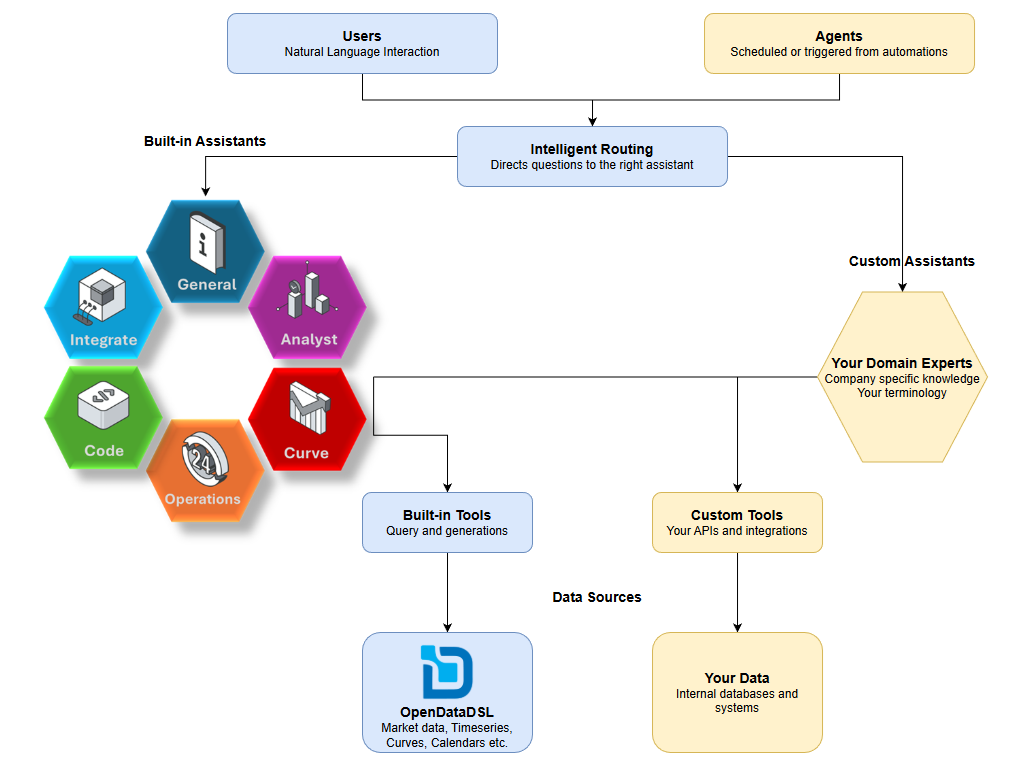
Playbooks sit beside Fusion's intelligent routing. A question in the chat is routed to the assistant best able to answer it. A playbook step is run on the assistant the playbook names, with only the tools that step allows. Both use the same built-in and custom assistants, the same tools, and the same governance: your access rights, approvals, budgets and a record of everything.
Getting started
Playbooks are available now in the Fusion AI extension. Open the Playbooks tab, browse the Library, and run your first task in minutes.
The documentation covers everything in detail, including the full playbook syntax with examples:
Your best analyst's process, available to the whole team, every day.
OpenDataDSL - Go Beyond the Basics.
Next steps
Do you want to see a playbook run on your own curves or datasets?
Tell us about the jobs your team repeats, and we will show you how a playbook can take them on.
- Contact us at info@opendatadsl.com
- Sign Up today and become part of the OpenDataDSL community!
- Fill out the form below, we will contact you to arrange a personally tailored demo.

How about a demo?
Our team is here to find the right solution for you, contact us to see this in action.
Fill out your details below and somebody will be in contact with you very shortly.